
Local Businesses: 5 Steps to Stop Wasted Spend in Performance Max Local

Performance Max configured for store goals is Google’s current campaign type for turning ad budget into store visits, calls, and in-person sales. If you have your locations linked, working conversion tracking, and enough volume to feed the algorithm, it’s worth running. If you’re a single location with thin conversion data and no store-visit measurement, start with Search or Local Service Ads and revisit Performance Max once you have traction.
TL;DR:
- Performance Max for store goals requires linked and verified Google Business Profiles to enable local formats like Maps and Waze, and without proper setup, visual assets won’t surface.
- Loss of granular control over placements means relying heavily on asset depth, site relevance, and audience signals to drive conversions effectively.
- Successful campaigns need a well-structured asset setup with multiple headlines, descriptions, images, and at least one video, ideally one per theme or product line.
- Store-visit measurement depends on anonymized location data, which may not activate for single locations with low traffic, requiring alternative offline conversion tracking.
- Proper initial setup—including verification, sufficient creative assets, correct targeting, and conversion tracking—is crucial before scaling or adjusting bidding strategies.
Table of Contents
- What Is Performance Max Local, and How Does It Actually Work?
- Where Do Local PMax Ads Actually Show Up?
- How Do You Set Up a Performance Max Local Campaign?
- Do You Need Local Inventory Ads and Merchant Center?
- How Does Store-Visit Measurement and Eligibility Actually Work?
- What Budget and Bidding Strategy Should You Use to Start?
- What Optimization Habits Separate Strong Local PMax Campaigns From Weak Ones?
- Anchorwave’s Quick Audit Checklist for Local PMax Accounts
- Why Most Local PMax Advice Still Sounds Like It’s Talking About Local Campaigns
- Get Hands-On Help Running Performance Max for Your Locations
- Sources
- FAQ
What Is Performance Max Local, and How Does It Actually Work?
Performance Max for store goals is a goal-based campaign type, not a channel that you pick. You tell Google what outcome you want (store visits, store sales, calls, direction requests) and hand over the raw materials: your location data, your creative assets, your budget, and your conversion signals. Google’s system does the rest, testing combinations of headlines, images, and audience signals across its full inventory to find what actually moves people toward that goal.
This is a real shift from how local advertising used to work. Older Local Campaigns asked you to set a few inputs and let Google run a narrow, fairly rigid rotation. Performance Max for store goals consolidates that into one campaign that draws on Search, Maps, YouTube, Display, Gmail, and Waze simultaneously, and it optimizes bidding and placement in real time rather than on a fixed schedule.
Choosing the store-goal objective (rather than online sales or leads) is what flips the switch. Once selected, Performance Max configures itself for local formats: it starts surfacing your business on Maps, promoting location extensions in Search results, and pushing store-visit-optimized ads through Waze and Display. The system leans hard on your linked location data to decide who sees what, and where. Miss that link, and the local formats simply don’t activate, no matter how good your creative is.
The tradeoff for that automation is visibility. You don’t control which exact placement wins a given impression; you control the inputs, then judge results through asset-group and channel reporting. For a local business owner used to picking exact keywords, that hand-off can feel uncomfortable at first. It also means the quality of what you feed the system, your assets, your signals, your location accuracy, matters more than it ever did with manually built campaigns.
Where Do Local PMax Ads Actually Show Up?
Performance Max spreads a single budget across surfaces that behave very differently, so it helps to know what each one is doing for you.
Maps and Waze carry the highest-intent traffic in the mix. Someone opening Maps to find a nearby option is often minutes from walking through your door, and Waze can push promotions to drivers passing near a location, which is why these two surfaces tend to produce the cleanest link between ad spend and actual foot traffic.
Search remains the demand-capture layer. When someone types “coffee shop open now near me,” Search-driven local formats surface your business with directions and call options attached, the same intent Local Search Ads used to chase, now folded into the broader campaign.
YouTube, Display, and Gmail play a different role entirely, building awareness and re-engaging people who’ve already interacted with your brand. These channels need genuine video or image assets to perform. Skip them, and Google either under-serves those placements or runs weak auto-generated creative in their place.
Google Business Profile assets, your photos, promotions, and posts, surface directly inside Maps results and local Knowledge Panels. A linked and verified Business Profile is what makes those assets eligible to appear at all, which is why it sits at the top of every proper setup checklist.
How Do You Set Up a Performance Max Local Campaign?
Launching a store-goal campaign correctly comes down to five setup steps, in this order.
- Link and verify your Google Business Profile. This is non-negotiable for local formats. Without a verified GBP connection, your location assets never surface on Maps or in local Knowledge Panels, and the store-visit objective has nothing to attach to.
- Set up Merchant Center if you’re showing inventory. Retailers offering buy-online-pickup-in-store or wanting to display in-stock products need a Merchant Center account linked with a local inventory feed, tagged with the correct feed labels.
- Build conversion actions for every offline outcome you care about. Calls, form submissions, appointment bookings, and store visits should each be a distinct conversion action, with the ones that matter most marked primary so the algorithm optimizes toward them specifically.
- Assemble asset groups tied to focused landing pages. One asset group per product or service line, each pointing to a page that matches the message, not your generic homepage.
- Confirm location targeting and URL settings before launch. Set targeting to “presence” so you reach people physically near your locations rather than anyone who merely searched your city name, and review final URL expansion and brand exclusions so Google doesn’t send traffic to unintended pages or bid on your own branded terms unnecessarily.
For the asset groups themselves, aim for real depth rather than the bare minimum:
- 5 or more headlines (Google allows up to 15, and more genuinely gives the system better combinations to test)
- 4 or 5 descriptions written for different angles, not the same sentence reworded
- At least 6 to 10 images spanning storefront, product, and lifestyle shots
- A logo in both square and landscape formats
- At least one video, even a simple 15 second phone-shot clip, since Performance Max otherwise generates its own from your images
The pattern connecting every one of these steps: Google can’t optimize for outcomes it can’t measure, and it can’t test creative it was never given.
Do You Need Local Inventory Ads and Merchant Center?
Local inventory ads matter only if you’re a retailer trying to show shoppers that a product sits on your shelf right now, or if you want to offer pickup as an option alongside delivery. If that’s not your model, a service business or restaurant, skip this section’s setup work entirely; it adds complexity you don’t need.
For retailers, local inventory ads require a Merchant Center account that’s verified and configured with accurate shipping and tax settings, plus a product feed that includes store-level availability, not just online stock. Google needs to know that a specific SKU is physically present at a specific address before it will surface a “in stock nearby” message to a shopper.
During Performance Max setup, you link Google Ads to that Merchant Center account and select the right feed label or country of sale. Get this mismatched, wrong feed label, unverified account, stale inventory data, and local inventory formats simply won’t trigger, even though the rest of the campaign runs fine. This is the single most common reason retailers report seeing no product-availability ads despite a technically live campaign.
Use local inventory when the goal is genuinely “come pick this up today.” If your business doesn’t sell physical, shelf-stocked products, this entire layer is optional overhead.
How Does Store-Visit Measurement and Eligibility Actually Work?
Store-visit tracking is the quiet gatekeeper of the whole system, and it’s the piece most local advertisers overlook until performance stalls. Google estimates visits using anonymized, opted-in location data from people’s devices, aggregated across enough visits and enough locations to protect individual privacy. That means store-visit conversion tracking only activates once you clear certain volume and privacy thresholds; a single-location business with modest traffic may simply not qualify yet, no matter how well the campaign is configured.
If you don’t meet that threshold, don’t treat it as a dead end. Build the campaign around offline signals you can measure directly instead:
- Phone call conversions, tracked through call reporting on ads and on your Business Profile
- Booking or appointment confirmations from your scheduling tool
- In-store coupon or promo code redemptions tied to a specific PMax asset
Before you scale budget on any of this, check your eligibility status directly in account settings, and run a real test: call the number on the ad, submit the form, book the slot. Confirm each one lands in your conversion reporting correctly. A campaign optimizing toward a conversion action that is silently broken will happily spend your budget chasing a goal it can’t actually verify.
What Budget and Bidding Strategy Should You Use to Start?
Every Performance Max campaign runs through a learning phase, typically several weeks, where cost per action runs higher than normal while the algorithm gathers enough conversion data to optimize confidently. Expect that dip. It’s not a sign the campaign is broken; it’s the system exploring before it commits to a pattern.
How much budget you need to get through that phase depends heavily on category. A multi-location service business with strong average order value can absorb a learning period on a modest budget; a single retail location competing in a crowded category needs more room to gather signal before the algorithm finds its footing. Underfunding the learning phase is one of the most common mistakes: with too little data flowing in, Google either allocates spend inefficiently or takes far longer to stabilize.
Start with Maximize Conversions or Maximize Conversion Value while data is thin. These strategies let the algorithm chase volume first, without the tighter constraints of a target. Once you’ve built a steady run of conversions, generally a few weeks of consistent activity, shift to Target CPA or Target ROAS to lock in efficiency at the level you’re actually seeing.
When it’s time to scale, move budget up in small increments, roughly 10 to 20 percent at a time, rather than doubling it overnight. Large, sudden jumps can trigger a new learning period, resetting the very stability you just built.
What Optimization Habits Separate Strong Local PMax Campaigns From Weak Ones?
Once a local Performance Max campaign is live, the difference between one that performs and one that stalls almost always comes down to structure and inputs, not luck.
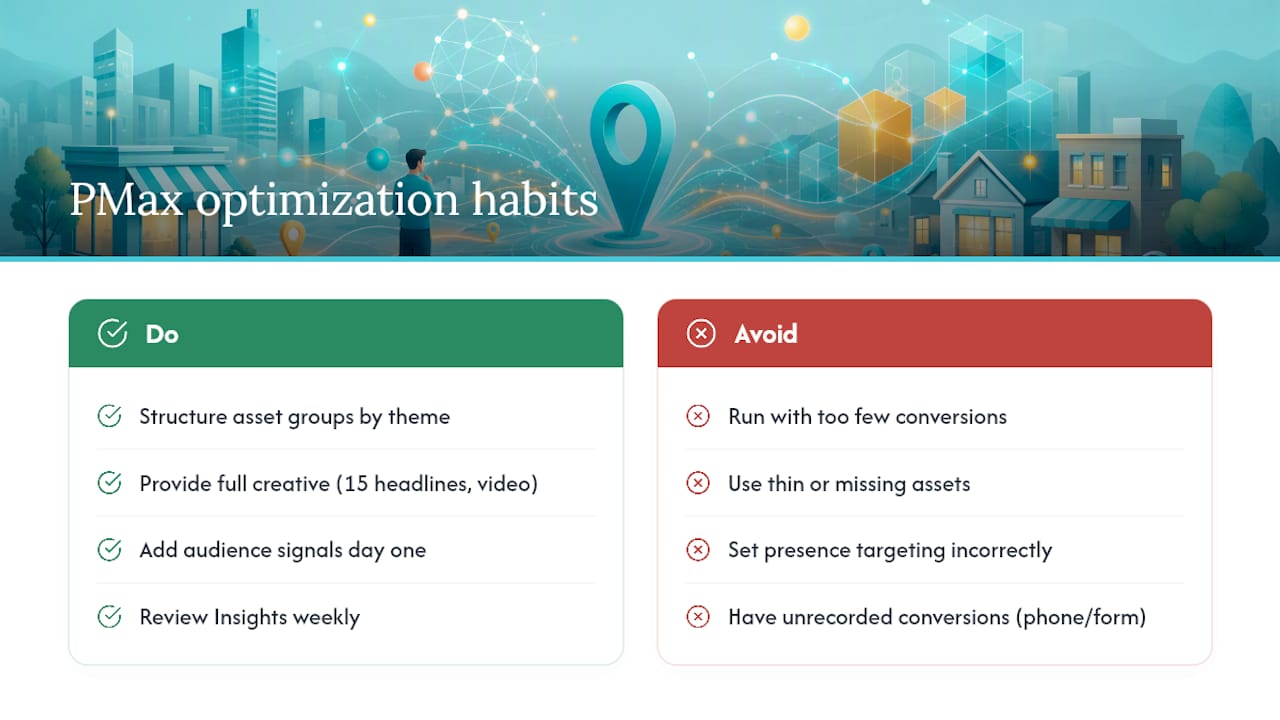
Structure asset groups around themes, not the whole business at once. One asset group per service line or product category, each pointing to a landing page built specifically for that message, consistently outperforms a single catch-all group trying to represent everything you sell. Google can only test combinations you give it, and a diluted asset group gives it nothing sharp to work with.
Feed the system genuine creative depth. Aim for close to the full 15 headlines Google allows, several distinct descriptions, a real spread of images, and at least one video. Thin asset groups don’t just underperform, they force Google to auto-generate filler creative from whatever it can scrape, which rarely matches your brand voice.
Layer in audience signals from day one. Upload customer lists, connect GA4 audiences, and add custom intent signals describing the kind of searcher you want. These don’t restrict who the campaign can reach, but they give the algorithm a head start instead of making it guess from a blank slate during the learning phase.
Apply negative keywords and brand exclusions at the account level. Performance Max doesn’t give you granular keyword control inside the campaign itself, so account-level exclusions are your main lever for keeping spend away from irrelevant searches or your own branded terms when that’s not the goal.
Watch the Insights and Search Themes reports weekly, not monthly. These panels reveal what’s actually driving conversions underneath the automated surface, letting you catch a weak asset group or a mismatched placement before it burns through meaningful budget.
Common failure points worth checking first when performance disappoints: too few recorded conversions to give the algorithm anything to learn from, thin or missing assets in one or more groups, “presence” targeting set too broadly or too narrowly for your actual trade area, and phone or form conversions that look fine on the front end but aren’t actually recording in Google Ads.
Pro Tip: Before troubleshooting anything else, place a test call and submit a test form yourself. A shocking number of underperforming local campaigns are optimizing correctly toward a conversion action that quietly stopped firing weeks ago.
Anchorwave’s Quick Audit Checklist for Local PMax Accounts
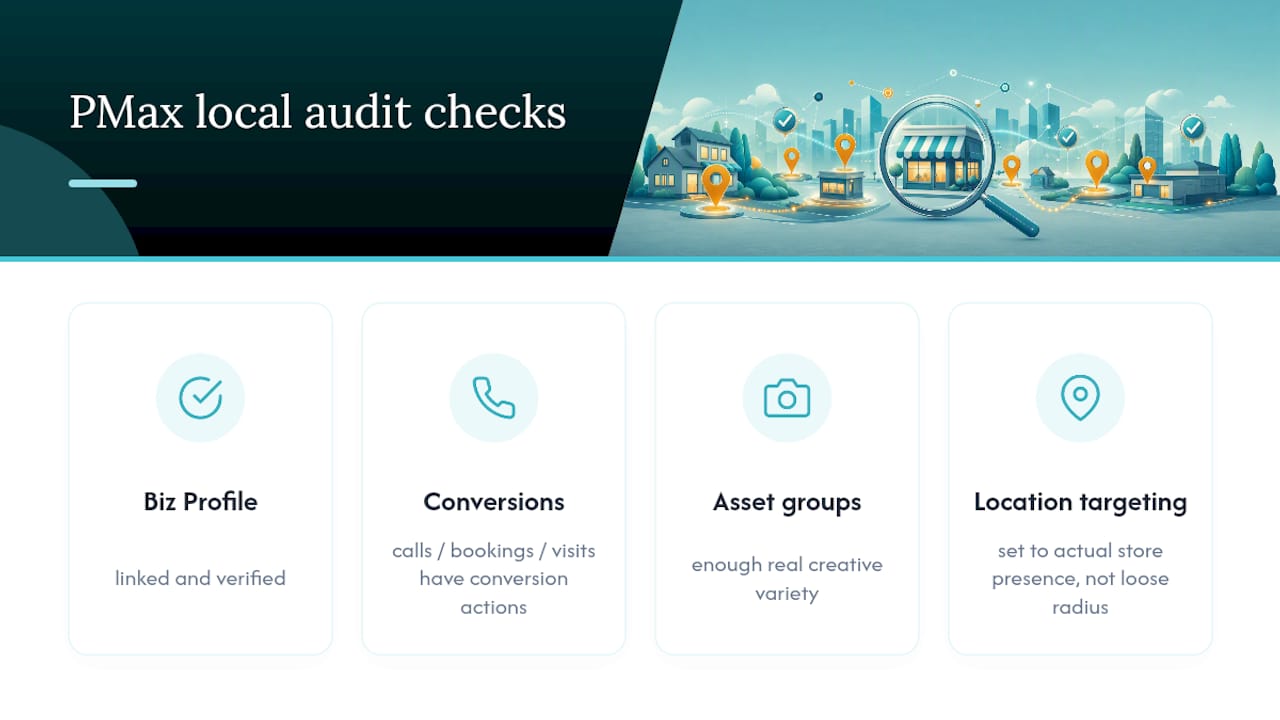
When we review a local Performance Max account, we check the same four things every time: is the Business Profile actually linked and verified, does every offline outcome (calls, bookings, visits) have a working conversion action, do asset groups have enough real creative variety, and is location targeting set to actual store presence rather than a loosely drawn radius.
A single location with clean tracking and decent asset depth can often run this well without outside help. Once you’re managing multiple locations, juggling Merchant Center feeds, or trying to untangle why conversions aren’t reporting correctly, that’s usually the point where a managed partner earns its keep.
Why Most Local PMax Advice Still Sounds Like It’s Talking About Local Campaigns
The mistake I see most often is advertisers treating Performance Max like a slightly upgraded version of the old Local Campaigns format, tweak a few settings and expect the same results with better reach. That thinking undersells how much the measurement layer now drives everything. Local Campaigns ran on relatively loose inputs. Performance Max punishes weak conversion tracking and thin creative far more visibly, because the algorithm has nothing honest to optimize toward.
The conventional advice, “just turn on the store goal and let it run,” skips the part that actually determines whether it works: whether your Business Profile is properly linked, whether every offline action is tracked, and whether you’ve given the system enough creative variety to test. Get those three right before you touch bidding strategy. Most underperforming local Performance Max accounts I’d expect to see aren’t failing because of budget or targeting. They’re failing because nobody checked if the conversion actions were actually firing before spend started flowing.
— Lilly
Get Hands-On Help Running Performance Max for Your Locations
Our service is an alternative to hiring a traditional in-house media buyer for local Performance Max management: instead of a generic package, asset groups, conversion tracking, and Merchant Center setup are tailored around specific locations before any budget goes live.

Our process runs in four stages: an account audit to catch the same gaps covered above, a technical setup phase covering conversion actions and Merchant Center links, managed optimization once the campaign clears its learning window, and monthly reporting so you always know which surface, Maps, Search, or Display, is actually driving visits. This work sits inside our digital marketing and PPC management services, and if your asset groups need dedicated landing pages built to match, our web design team handles that build alongside the campaign. Pairing this with strong local SEO fundamentals tends to compound results, since organic visibility and paid store-visit ads reinforce the same local search real estate. If you manage more than one location, our multi-location marketing overview is worth a read before your next planning cycle.
If you want to see what a properly configured local account looks like for your business, contact a digital marketing consultant for a straightforward audit of your current setup.
FAQ
Is Performance Max Worth It for a Local Business?
It’s worth it once you have linked locations, working conversion tracking for calls or visits, and enough conversion volume to get through the learning phase. A single location with minimal tracking and low traffic should build that foundation first, then add Performance Max once the basics are in place.
What Does Performance Max Actually Optimize For When You Choose Store Goals?
It optimizes for offline outcomes, primarily store visits, store sales, and local actions like direction requests and calls, using your linked location data and conversion signals to allocate budget and creative across Google’s channels.
Is $20 a Day a Reasonable Budget for Local Performance Max?
It depends heavily on your category and conversion value; $20 a day can work for a low-competition local service business but will likely struggle to get a retail campaign with local inventory through its learning phase efficiently. Treat it as a floor to test with, not a number to expect strong results from immediately.
How Do I Turn Off Google Local Service Ads if I’m Moving to Performance Max?
You can pause or turn off Local Service Ads directly from your Local Services Ads dashboard settings, but most practitioner guidance recommends running the two alongside each other rather than replacing one with the other, since LSAs retain tighter control over high-intent search queries that Performance Max handles differently.
Do I Need Merchant Center for Every Local Performance Max Campaign?
No. Merchant Center is only required if you’re using local inventory ads to show in-stock products or pickup availability; service businesses and restaurants running store-visit goals can skip that setup entirely.
Recommended